


Most people use three buttons on their air conditioner remote: on, off and the temperature arrows. The rest of the air conditioner symbols, the snowflake, the sun, the water droplet, the little fan and the letter A, get ignored, and that is a shame, because the right mode makes a Perth summer more comfortable and the power bill smaller. Dry mode in particular is one of the most useful settings on a humid day, and one of the least understood.
This guide explains what each mode does, decodes the extra buttons on Daikin, Mitsubishi Electric, Fujitsu and Panasonic remotes, and covers the settings that save power. Everything here comes from the manufacturers’ own manuals and support pages, listed at the end. Remote designs change between models, so always check the display diagram in your own manual. If you have a ducted system, the wall controller uses the same modes, and our ducted air conditioning Perth guide explains how its zones work.
The five air conditioner modes and their symbols
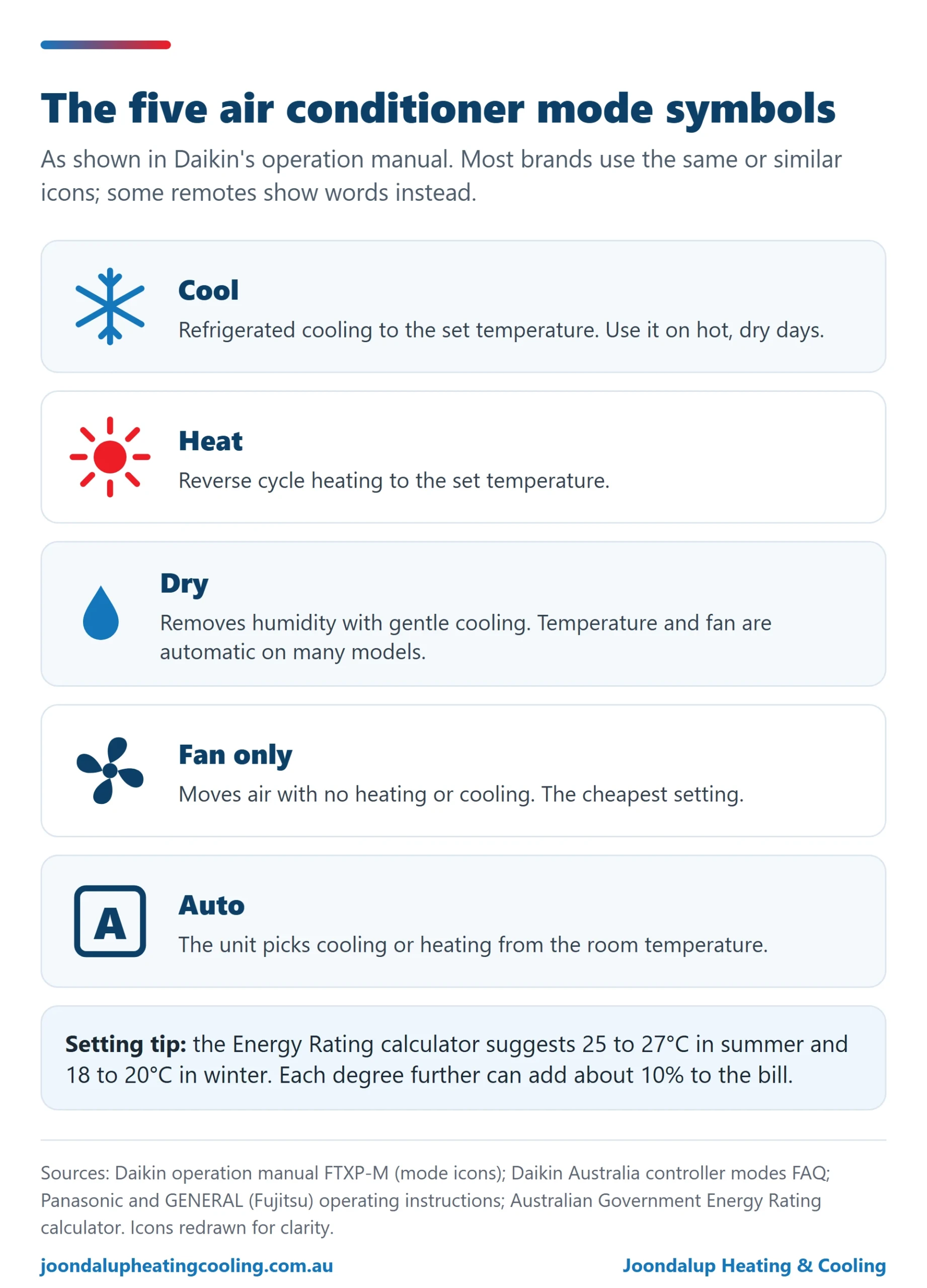
Daikin’s operation manual shows the five standard mode icons on its remote display, and most brands use the same or very similar pictures. Some remotes, like Panasonic’s, show the mode as a word on the screen instead.
| Symbol (Daikin manual) | Mode | What it does |
|---|---|---|
| Snowflake | Cool | Refrigerated cooling to the set temperature. |
| Sun | Heat | Reverse cycle heating to the set temperature. |
| Water droplet | Dry | Removes humidity with gentle cooling. Temperature and fan are controlled automatically on many models. |
| Fan | Fan only | Moves air with no heating or cooling. |
| Letter A in a box | Auto | The unit chooses cooling or heating for you based on the room temperature. |
What is dry mode on an aircon?
Dry mode is a dehumidifying setting. Daikin Australia describes it as eliminating humidity while maintaining the indoor temperature as much as possible, with temperature and airflow controlled automatically. Panasonic’s manual says it operates at a low fan speed for a gentle cooling operation, and GENERAL (Fujitsu) says it provides gentle cooling while dehumidifying, and that the indoor fan may stop at times. No brand we checked describes dry mode as heating.
When should you use air conditioner dry mode in Perth? On muggy days when the temperature is bearable but the air feels sticky, typically when a coastal change or a summer storm pushes humidity up. On a dry 40 degree day, cool mode is the right choice. On both Daikin and Mitsubishi Electric models you cannot adjust the temperature in dry mode, so do not be surprised when the arrows do nothing.
Auto mode and fan mode: what they really do
Auto mode lets the unit pick between cooling and heating. Daikin Australia says it selects an appropriate operation mode, cool or heat, based on the indoor temperature. Panasonic’s manual says its unit selects an operation mode every 10 minutes depending on the setting and room temperature. Auto is handy in spring and autumn, when mornings are cold and afternoons warm.
Fan mode just circulates air. GENERAL describes it as circulating air with no heating or cooling, and Mitsubishi Electric’s service manual says only the indoor fan operates and the outdoor unit does not run. That makes air conditioner fan mode the cheapest setting on the remote, useful for moving air on a mild evening.
Separate from the mode is the fan speed button. Daikin’s manual shows five airflow levels as bars, an A for automatic airflow and a quiet setting that reduces indoor unit noise. Fujitsu offers auto, high, medium, low and quiet, and Panasonic steps through fan auto, quiet and five speeds.

Daikin air conditioner symbols and buttons
- Powerful: quickly maximises cooling or heating in any mode, runs for 20 minutes and then returns to the previous setting, according to Daikin’s operation manual.
- Econo: limits the maximum power consumption, which helps when the unit shares a circuit with other appliances.
- Comfort airflow: directs air so it does not blow directly on people, upwards in cooling and downwards in heating.
- Intelligent Eye: Daikin Australia says that if no movement is detected for 20 minutes, the unit shifts to a more efficient setting and returns to normal when someone comes back.
- On and off timers: on the model manual we checked, each press of the off timer adds an hour, from 1 to 12 hours, and the on timer works the same way while the unit is off.
We supply and install Daikin split and ducted systems across Perth: see Daikin air conditioning Perth.
Mitsubishi Electric air conditioner symbols and buttons
- Econo Cool: in cool mode the set temperature is automatically raised 2 degrees while the vane swings to make the room feel cooler than the setting, per Mitsubishi Electric’s service manual.
- i-save: stores your preferred temperature, fan and vane settings so one press brings them back. It cannot be used in dry or auto.
- Vane and wide vane: set the up and down angle (or swing) and the left and right direction.
- 3D i-See sensor: on models that have it, Mitsubishi Electric describes an infrared sensor that measures temperatures across the room and adjusts airflow to prevent over-cooling or over-heating.
- Weekly timer: lets you program on and off times by day, once the clock is set.
Mitsubishi Electric remotes vary between the AP, LN and EF ranges, so match the buttons to your model’s manual. Our Mitsubishi Electric air conditioning Perth page covers the models we install.
Fujitsu air conditioner symbols and buttons
- Powerful: runs at maximum power until the set temperature is reached or for about 20 minutes, according to GENERAL’s operation manual.
- Economy: caps output at about 70 per cent of normal to save power.
- 10 degree heat: keeps the room at about 10 degrees, useful for a holiday home in winter. It will not heat if the room is already at or above 10 degrees.
- Human sensor: after 20 minutes with nobody in the room, the set temperature rises 2 degrees in cooling and drops 4 degrees in heating.
- Swing: moves the louvres through a set range of positions, different for cooling and heating.
GENERAL is the company formerly known as Fujitsu General Australia, and its support site holds the Fujitsu manuals. See Fujitsu air conditioning Perth for our installation range.
Panasonic air conditioner symbols and buttons
- iAUTO-X: Panasonic’s fast cooling setting. It lowers the temperature 2 degrees below your setting, fixes the fan on auto and runs for a maximum of four hours.
- Powerful and Eco: one button cycles between them. Powerful reaches the set temperature quickly and stops after 20 minutes; Eco, shown with a leaf, reduces power consumption.
- Quiet: reduces airflow noise.
- nanoe X: Panasonic says it provides cleaner air and deodorises odours, and it can run whether the unit is on or off.
- Sleep: adjusts the temperature pattern through the night over a timer you choose.
Our Panasonic air conditioning Perth page lists the Panasonic systems we install.

What is a good setting for an air conditioner?
The Australian Government’s Energy Rating calculator suggests 25 to 27 degrees in summer and 18 to 20 degrees in winter, and warns that every degree lower for cooling or higher for heating could add about 10 per cent to your electricity bill. Use cool mode on hot dry days, dry mode on humid ones, and the timer so the system is not running in empty rooms. For a ducted home, shut the zones nobody is using; our post on ducted air conditioning running costs and zones shows what that does to the bill.
Why won’t my air conditioner start straight away? The 3 minute rule
Most units protect the compressor with a short restart delay. Mitsubishi Electric’s manual says the compressor will not restart for 3 minutes, GENERAL says a protection delay of about 3 minutes may prevent compressor operation after stopping, and Panasonic says operation is delayed a few minutes after restarting to protect the compressor. If your unit does not start the moment you press the button, wait a few minutes before assuming a fault. If it still will not run, a dirty filter is the first thing to check, and our guide on how to clean an air conditioner filter shows how. For other causes, read air conditioner not cooling.
Air conditioner symbols: frequently asked questions
What do the symbols on an air conditioner mean?
The five standard mode symbols shown in Daikin’s manual are a snowflake for cool, a sun for heat, a water droplet for dry, a fan for fan only and the letter A for auto. Extra symbols, such as fan speed bars, quiet, eco and timers, vary by brand and model, so check your manual.
What is the purpose of dry mode in an aircon?
Dry mode removes humidity with gentle cooling. Daikin Australia says it eliminates humidity while maintaining the indoor temperature as much as possible. Use it on muggy days rather than very hot, dry ones.
Which AC mode is cold?
Cool mode, usually shown as a snowflake, is the cold setting. Dry mode also cools gently while removing humidity.
What is a good setting for an air conditioner?
The Australian Government’s Energy Rating calculator suggests 25 to 27 degrees in summer and 18 to 20 degrees in winter. Each degree cooler in summer or warmer in winter can add about 10 per cent to your power bill.
Is 24 degrees hot or cold in AC?
In cool mode, 24 degrees is a little below the 25 to 27 degree summer range suggested by the Energy Rating calculator, so it will feel cool and cost a little more to run than 25 or 26.
How do I use the dehumidifier mode on my Daikin air conditioner?
Select dry mode, the water droplet symbol, with the mode button. Daikin’s manual notes you cannot adjust the temperature or the fan speed in dry mode, because the unit controls them automatically.
How do I reset a Daikin air conditioner?
Daikin’s operation manual advises turning off the power supply if the unit does not respond to the operation switch, and reporting any error code shown to your installer. If it still will not run after power is restored, book a technician.
How do I set the timer on a Daikin air conditioner?
On the Daikin model manual we checked, press the off timer button while the unit is running; each press adds one hour, up to 12 hours. The on timer works the same way while the unit is off. Check your own model’s manual, as remotes differ.
What is the 3 minute rule for air conditioners?
Most units wait about three minutes before restarting the compressor after it stops, to protect it. Mitsubishi Electric and GENERAL both state a delay of about three minutes in their manuals.
Planning a new split or ducted system with controls that make sense?
Licensed local team. Free quote, no obligation. Call (08) 6200 9718.
Sources
- Daikin, Operation manual, FTXP-M room air conditioners (mode icons, Powerful, Econo, Comfort airflow, timers, airflow levels)
- Daikin Australia, What do the controller modes mean? and What is Daikin Intelligent Eye?
- Mitsubishi Electric, Service manual OBH788, MSZ-AP series (dry, fan, auto, Econo Cool, i-save, vanes, weekly timer, 3 minute delay)
- Mitsubishi Electric Australia, MSZ-AP brochure (3D i-See sensor)
- GENERAL (formerly Fujitsu General Australia), ASTG18LUCB operation manual, 10 degree heat and Human sensor
- Panasonic Australia, Operating instructions CS-HZ25-80YKR
- Australian Government, Energy Rating calculator: air conditioner information (recommended thermostat settings)